HOME - Detecting Nmap Network Reconnaissance in a Windows Domain Lab
 Detecting Nmap Network Reconnaissance in a Windows Domain Lab
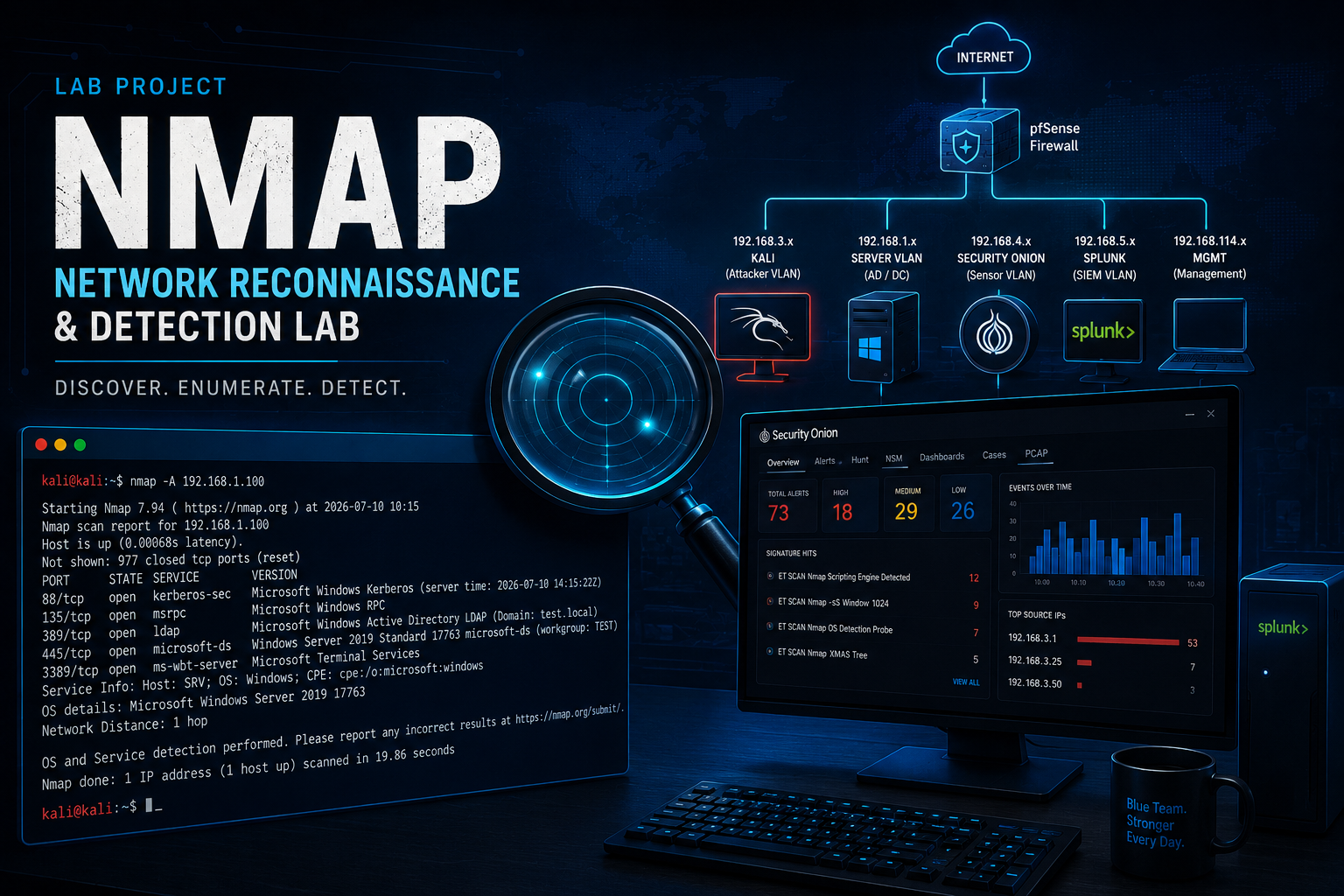
| Role | SOC Analyst / Security Researcher |
|---|---|
| Environment | VMware Lab |
| Attack | NMAP Network Reconnaissance & Detection Lab |
| Detection | Wireshark · Security Onion · Splunk |
| Status | Successfully Investigated |
Simulated Nmap reconnaissance against a Windows Server 2019 Active Directory environment and correlated host discovery, port-scanning, service-enumeration, packet-capture, IDS, and network-metadata evidence using Wireshark, Security Onion, Suricata, and Zeek.
PROJECT OVERVIEW
This project demonstrates how a SOC analyst can detect and investigate network reconnaissance performed with Nmap inside a Windows domain lab. A Kali Linux workstation was used to probe a Windows Server 2019 domain controller through multiple scanning techniques, including host discovery, TCP service enumeration, operating-system fingerprinting, NSE script execution, and UDP scanning.
The resulting network activity was then analyzed across Wireshark and Security Onion. Suricata generated signature-based alerts associated with Nmap, while Zeek preserved detailed connection metadata that helped reconstruct the scan. The objective was to connect the source system, target server, discovered services, packet-level behavior, and IDS evidence into one defensible investigation timeline.
OBJECTIVES
– Verify network connectivity between the Kali Linux workstation and the target server.
– Identify the attacker’s configured lab interfaces and IP address.
– Perform TCP service enumeration and operating-system fingerprinting with Nmap.
– Identify Windows and Active Directory services exposed by the target.
– Perform a UDP scan to identify reachable UDP services.
– Analyze TCP SYN, SYN/ACK, ICMP, and UDP behavior in Wireshark.
– Review Suricata alerts generated by Security Onion.
– Use Zeek connection logs to reconstruct the reconnaissance activity.
– Correlate evidence across scanning, packet-capture, and monitoring tools.
LAB ENVIRONMENT
– Kali Linux reconnaissance workstation: 192.168.3.1
– pfSense firewall/router
– Windows Server 2019 domain controller: 192.168.1.100
– Windows 11 client
– Security Onion
– Suricata
– Zeek
– Wireshark
– VMware Workstation
– Active Directory test domain
LAB TOPOLOGY
The environment used multiple virtual networks connected through pfSense. Kali Linux represented the reconnaissance source on a separate subnet, while the Windows Server 2019 domain controller hosted Active Directory and common enterprise services. Security Onion monitored the traffic so that the scan could be evaluated from a defensive perspective.
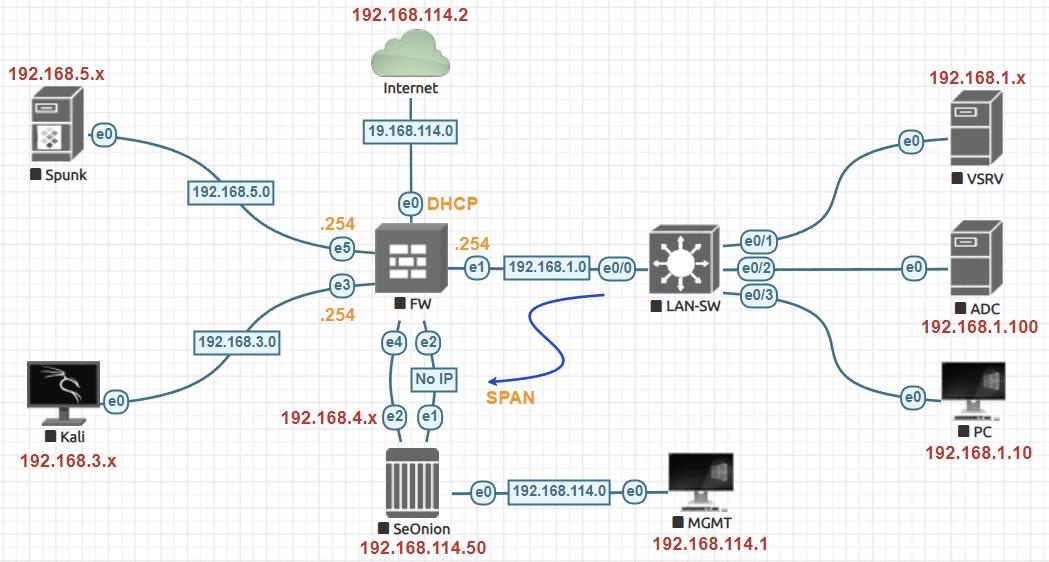
Segmented VMware lab used to simulate Nmap reconnaissance from Kali Linux against a Windows Server 2019 Active Directory domain controller while Security Onion monitored the traffic.
PHASE 1 — NETWORK CONFIGURATION AND CONNECTIVITY
Before scanning the server, I verified the Kali Linux network configuration. The system had an address on the 192.168.3.0/24 reconnaissance subnet and a second monitoring interface without an assigned IPv4 address.
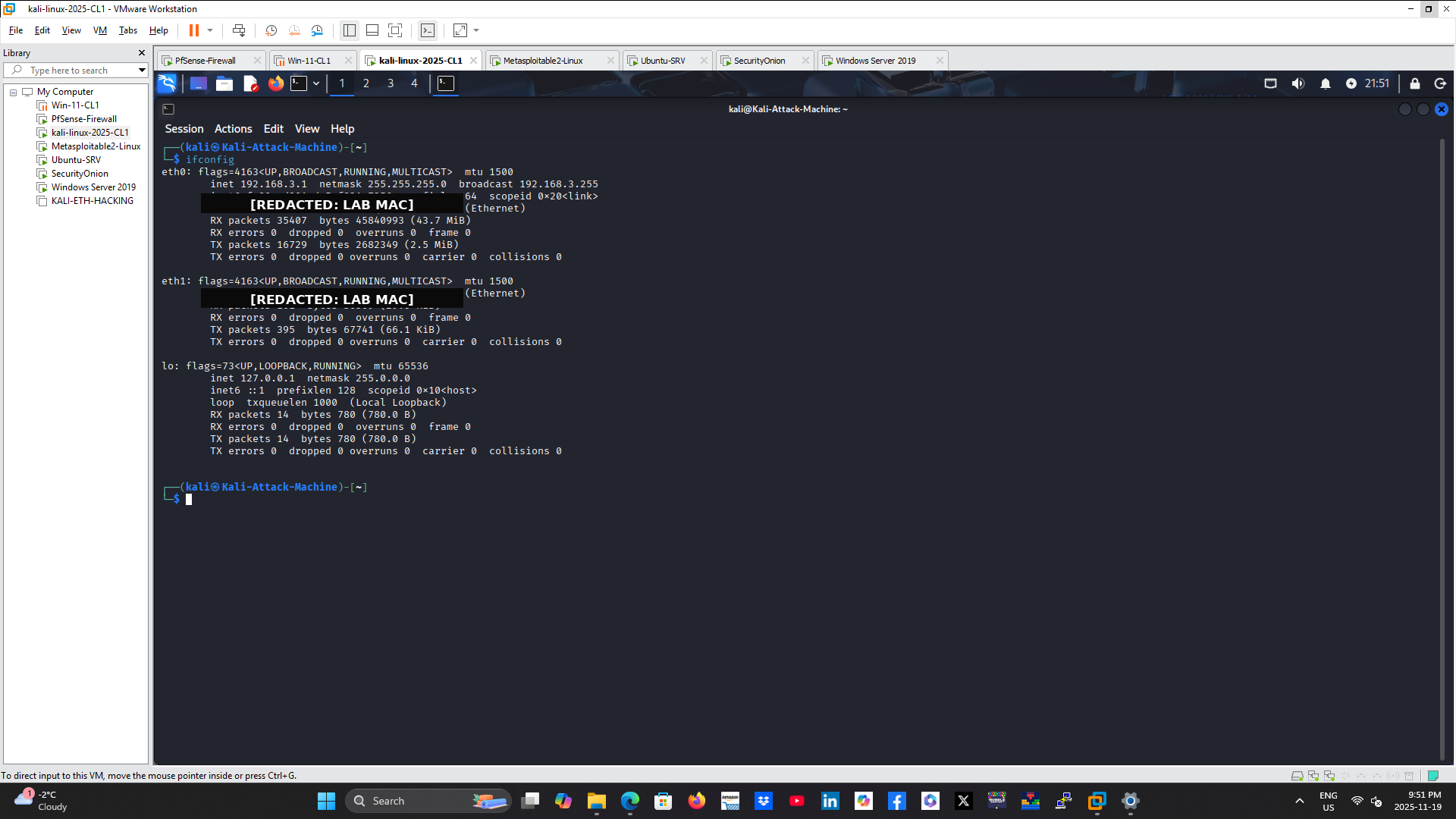
Kali Linux interface configuration confirming the reconnaissance workstation’s lab network placement. VMware MAC addresses were redacted before publication.
I then tested connectivity to the Windows Server 2019 domain controller. The target responded successfully to ICMP Echo Requests with no packet loss, confirming that the route through pfSense was functioning before the scan began.
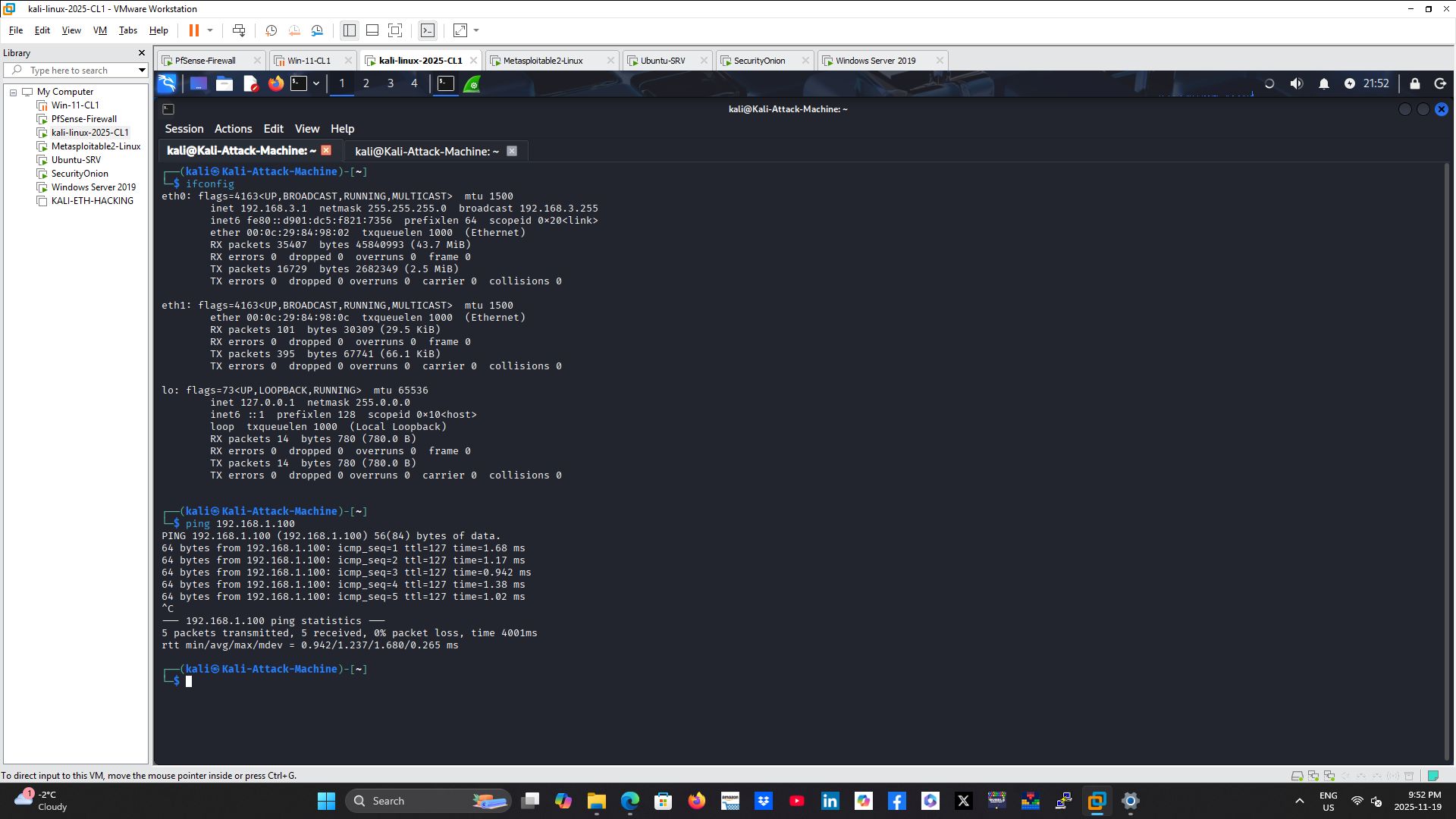
Successful ICMP connectivity test from Kali Linux to the Windows Server 2019 target at 192.168.1.100.
PHASE 2 — TCP SERVICE ENUMERATION AND OS FINGERPRINTING
An aggressive Nmap scan was performed against the server:
nmap -A 192.168.1.100
This scan combined service-version detection, operating-system fingerprinting, traceroute, and default NSE script execution. Nmap identified services commonly associated with a Windows Active Directory domain controller, including:
– TCP 53 — DNS
– TCP 88 — Kerberos
– TCP 135 — Microsoft RPC
– TCP 139 — NetBIOS Session Service
– TCP 389 — LDAP
– TCP 445 — SMB
– TCP 464 — Kerberos password change
– TCP 593 — RPC over HTTP
– TCP 636 — LDAPS
– TCP 3268 and 3269 — Active Directory Global Catalog
– TCP 3389 — Remote Desktop Services
– TCP 5985 — Windows Remote Management
The scan also identified Windows Server characteristics, RDP metadata, SMB signing requirements, and the target’s network distance.
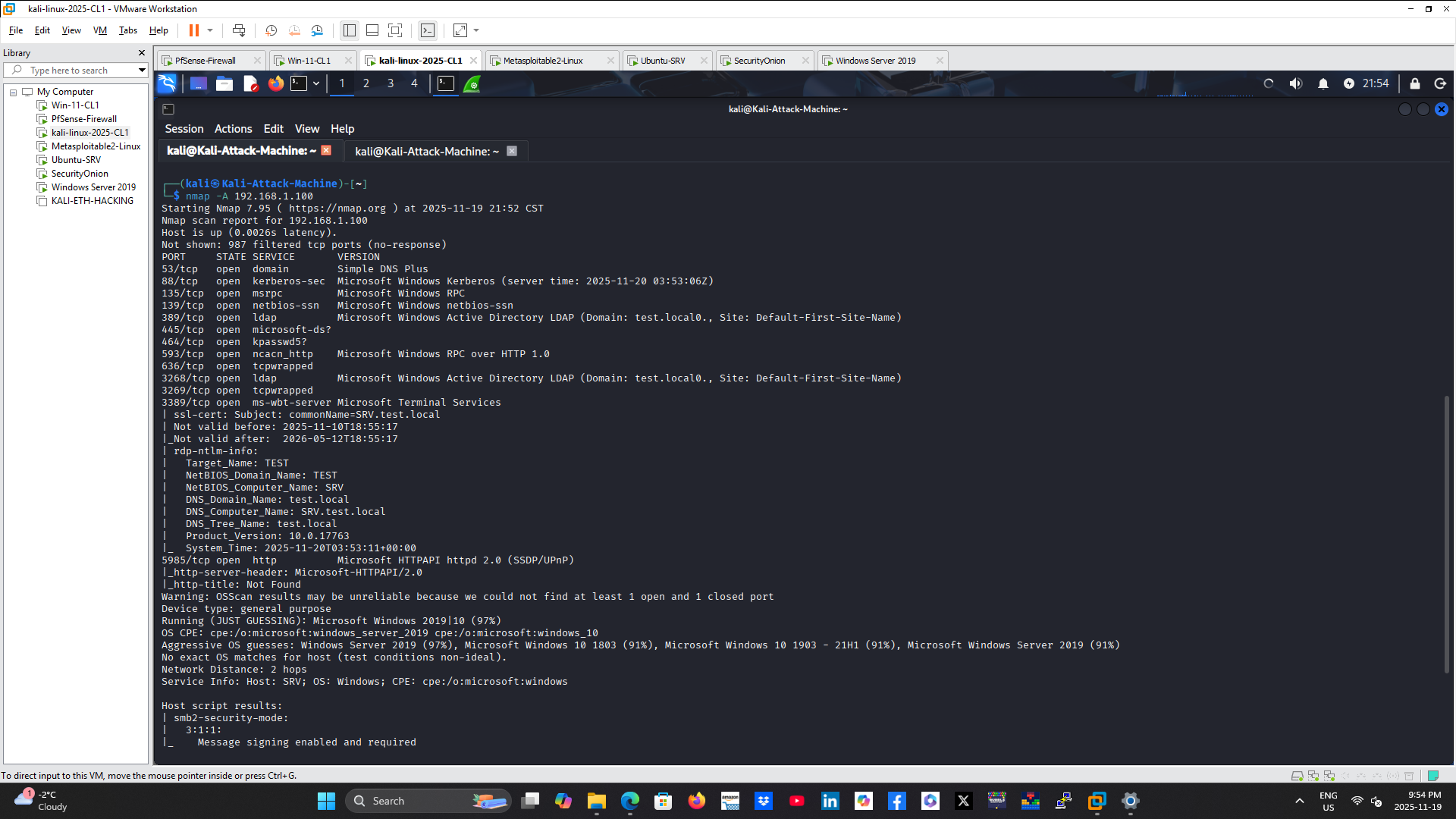
Aggressive Nmap scan identifying Windows, Active Directory, RPC, LDAP, SMB, RDP, and management services exposed by the target.
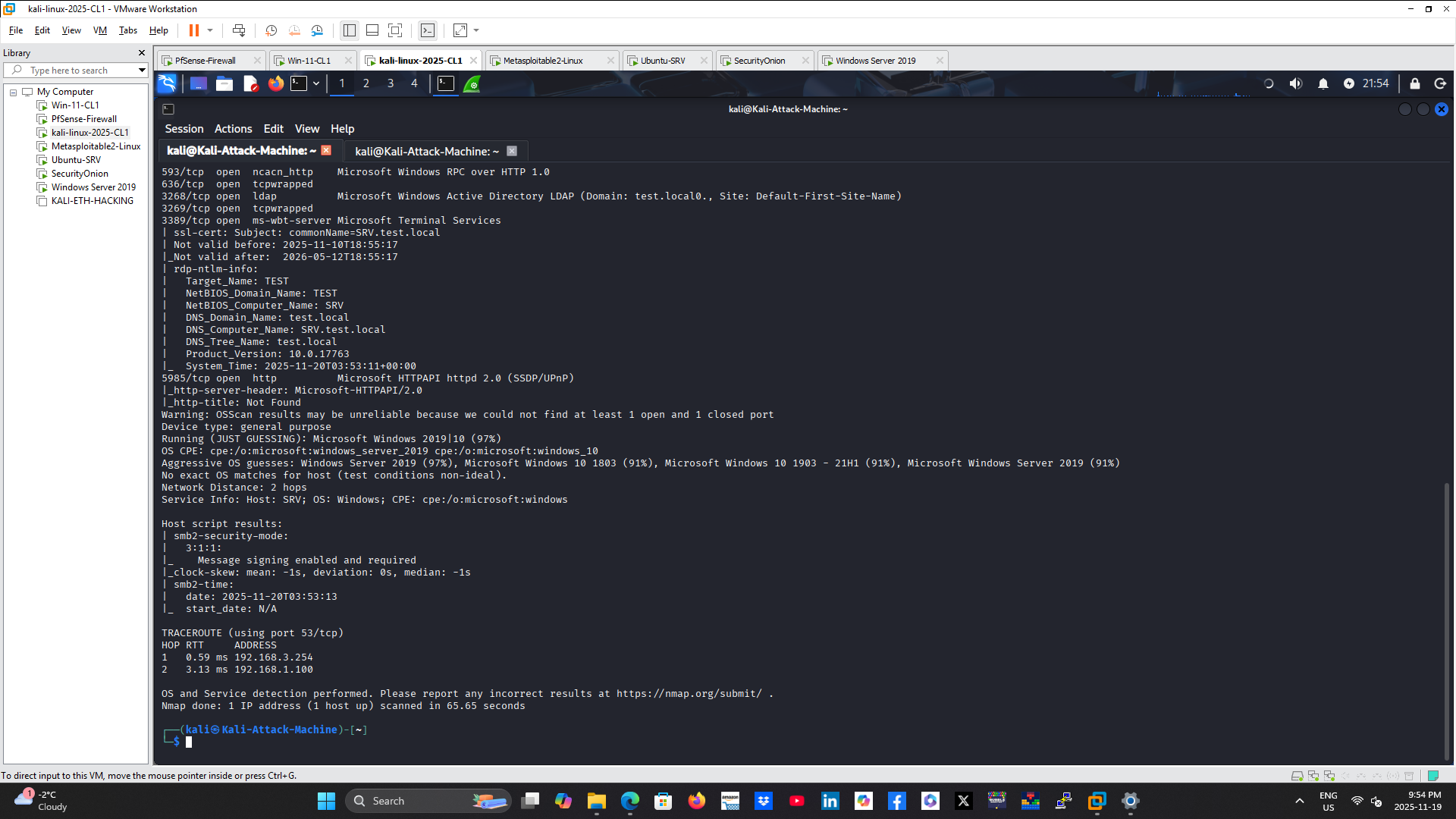
Continuation of Nmap results showing Windows Server fingerprinting, SMB signing status, clock information, traceroute, and service metadata.
PHASE 3 — UDP SERVICE ENUMERATION
A UDP scan was run with:
sudo nmap -sU 192.168.1.100
The scan identified several reachable UDP services, including DNS, Kerberos, NTP, and NetBIOS-related communication. UDP scanning is valuable because services operating without TCP may otherwise be missed during reconnaissance.
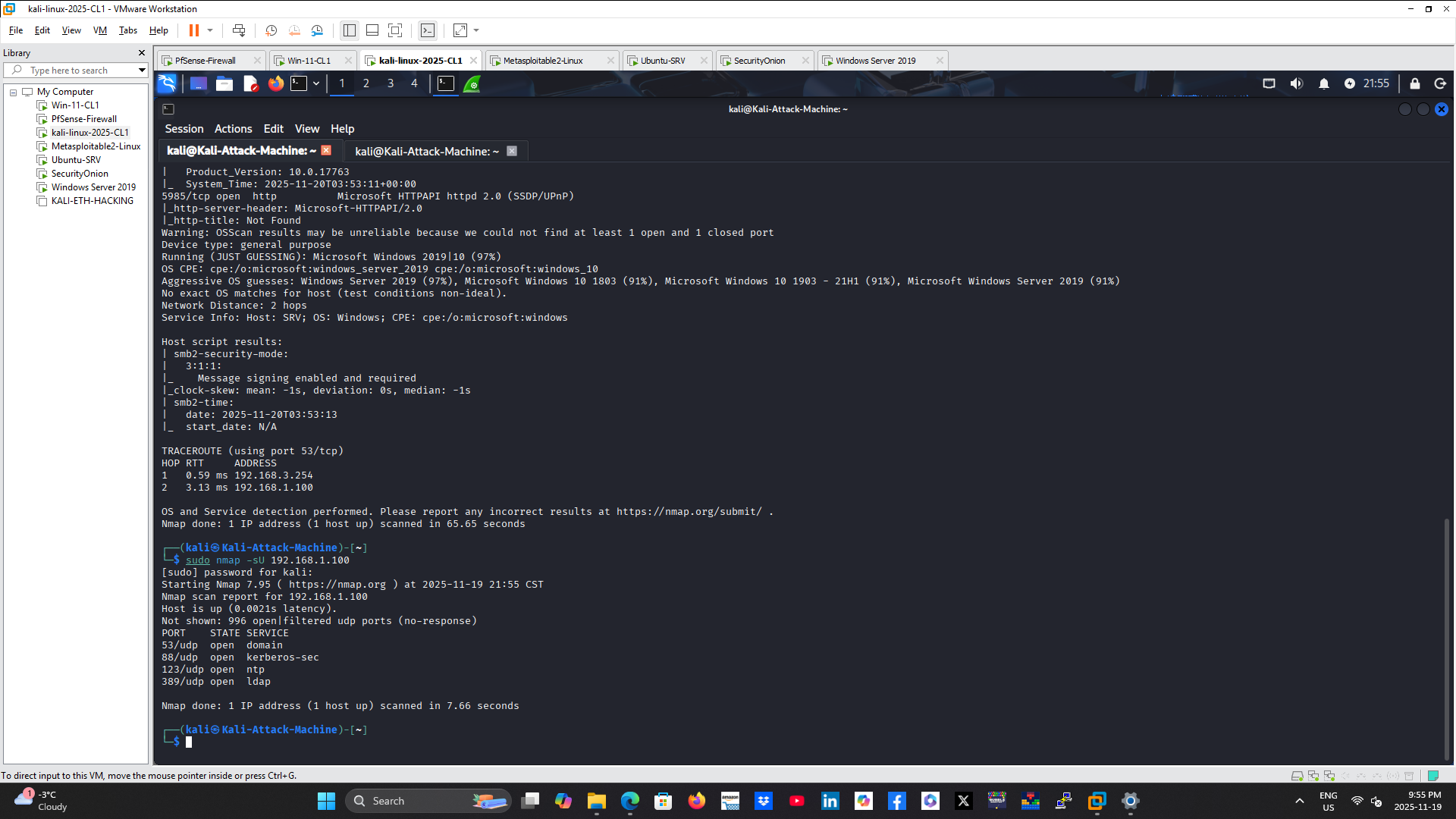
Nmap UDP scan identifying reachable services such as DNS, Kerberos, NTP, and NetBIOS-related traffic on the Windows Server target.
PHASE 4 — PACKET ANALYSIS WITH WIRESHARK
Wireshark captured the network traffic generated during reconnaissance. Multiple display filters were used to isolate different phases of the scan.
TCP SYN SCAN BEHAVIOR
Display filter:
tcp.flags.syn == 1 && tcp.flags.ack == 0
The capture showed the Kali Linux source sending TCP SYN packets toward many destination ports on the server. This fan-out pattern is consistent with port scanning because one source rapidly probes numerous services on the same destination.
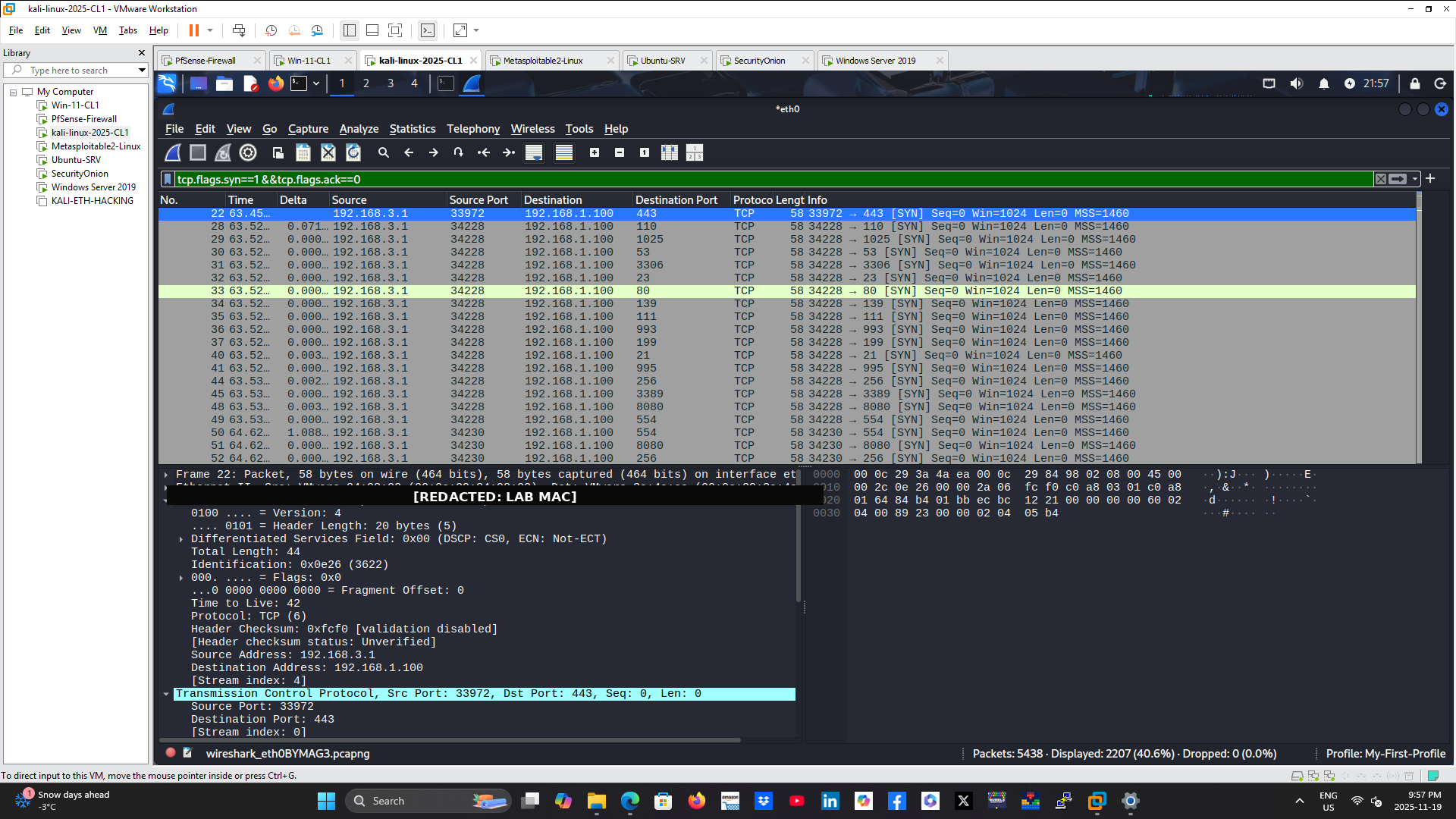
Wireshark view of TCP SYN probes sent from 192.168.3.1 to multiple ports on 192.168.1.100. VMware MAC addresses were redacted.
UDP SCAN TRAFFIC
Display filter:
udp && ip.src == 192.168.3.1
The UDP view showed probes and related traffic involving DNS, NTP, NetBIOS, and high-numbered ports. This supported the Nmap UDP scan findings and provided packet-level evidence of the reconnaissance activity.
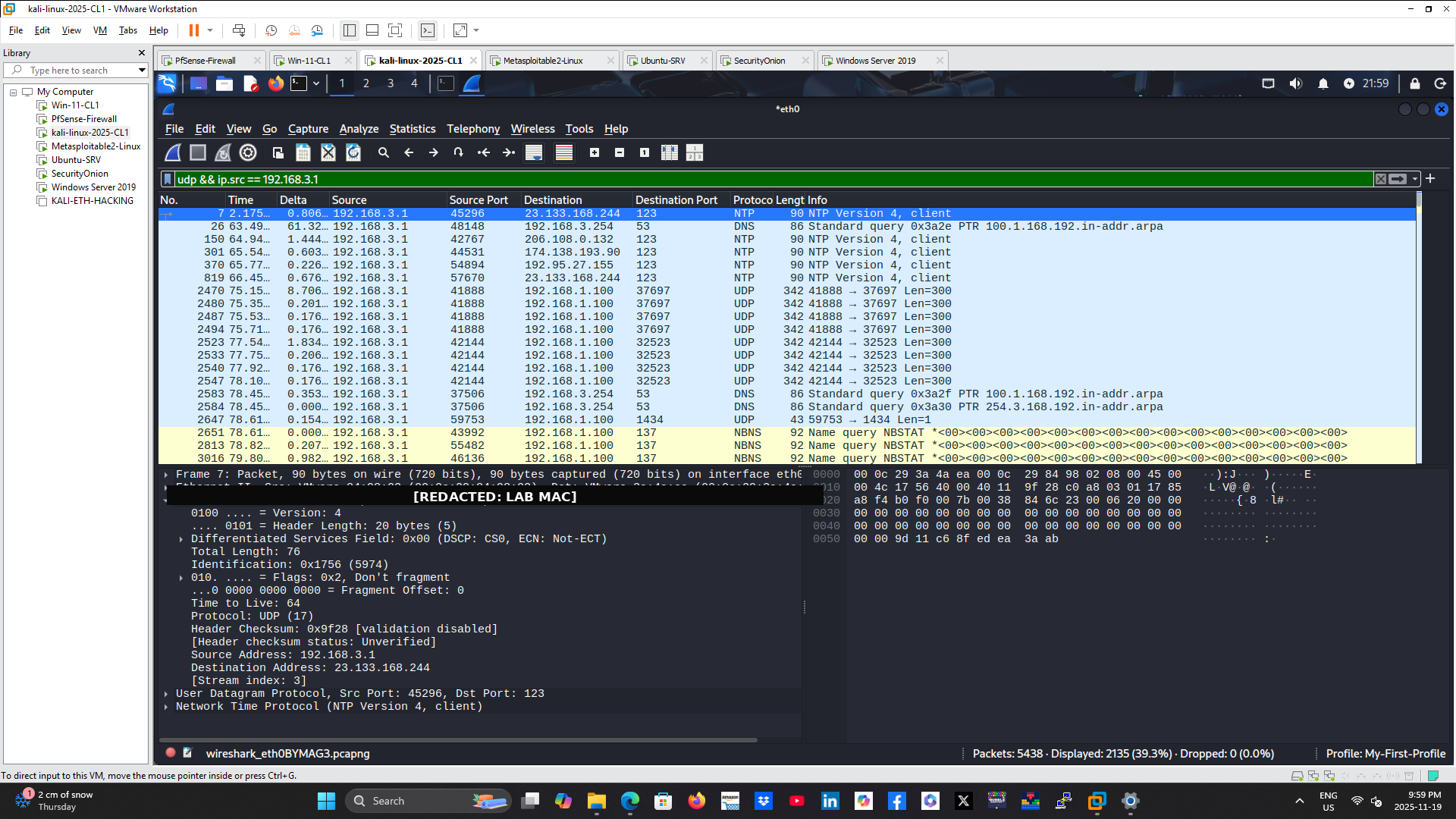
UDP traffic generated during reconnaissance, including probes and supporting protocol activity. VMware MAC addresses were redacted.
ICMP RESPONSES
Display filter:
icmp.type == 3 || icmp.type == 0
Wireshark showed successful Echo Replies as well as Destination Unreachable responses. These ICMP messages help scanning tools determine host availability and interpret the status of probed UDP ports.
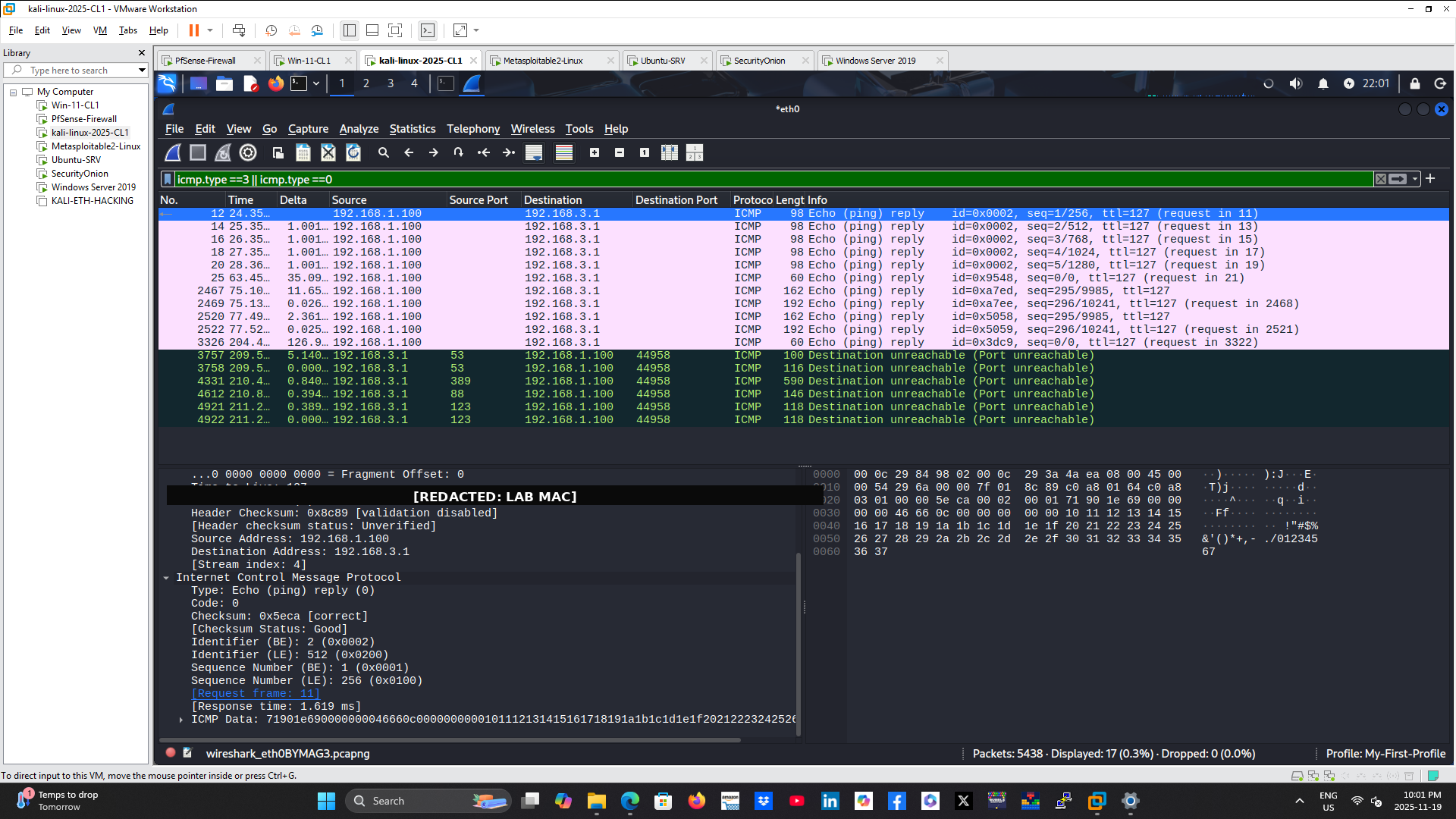
ICMP Echo Replies and Destination Unreachable responses observed during host discovery and UDP scanning. VMware MAC addresses were redacted.
SYN/ACK RESPONSES FROM OPEN PORTS
Display filter:
tcp.flags.syn == 1 && tcp.flags.ack == 1
The server returned SYN/ACK packets from listening TCP services. These responses allowed Nmap to classify the corresponding destination ports as open.
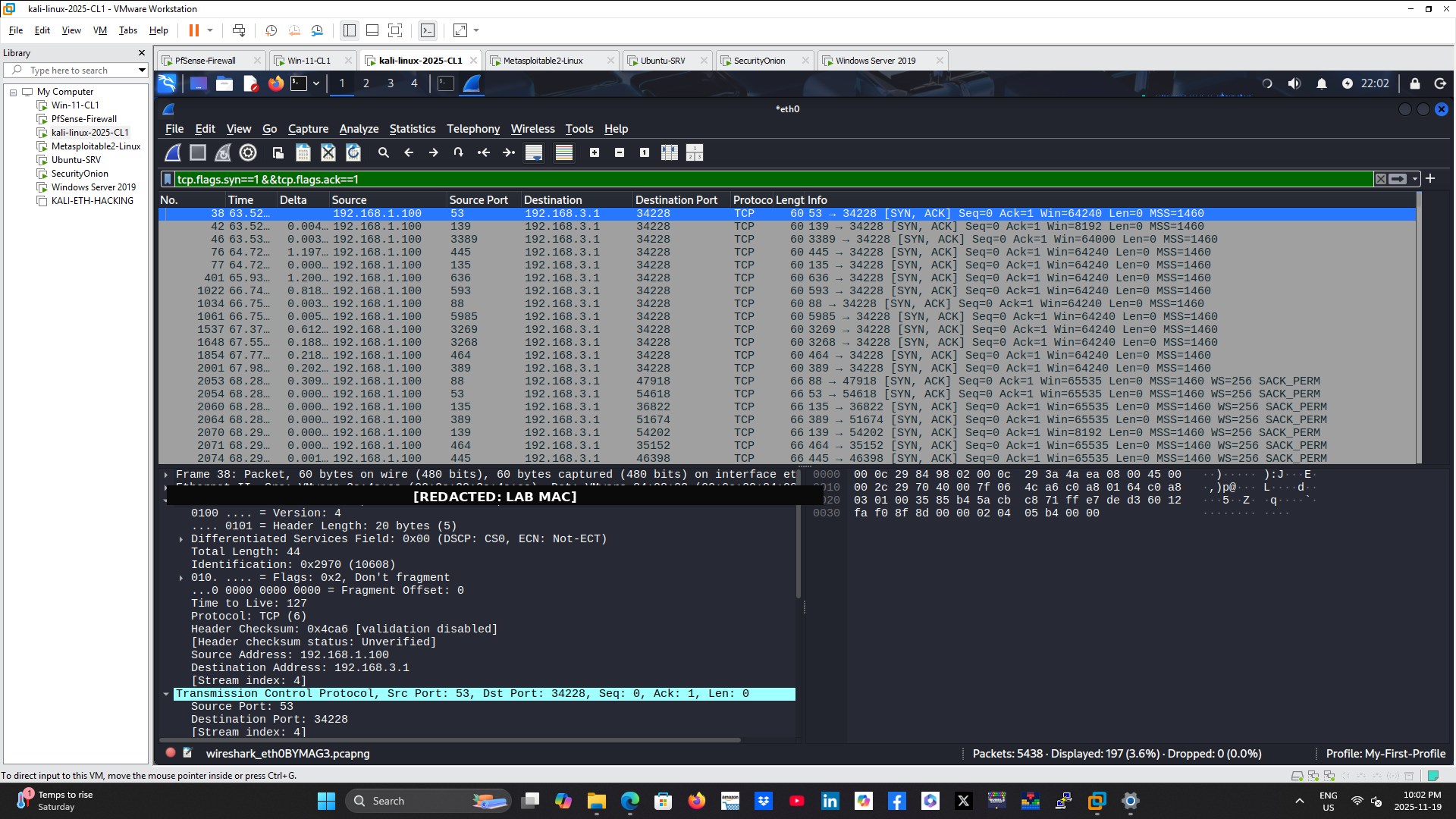
SYN/ACK responses from active Windows services confirming open TCP ports during the Nmap scan. VMware MAC addresses were redacted.
PHASE 5 — IDS DETECTION WITH SECURITY ONION
Security Onion detected the reconnaissance activity using Suricata signatures. Alerts included:
– ET SCAN Nmap Scripting Engine User-Agent Detected
– ET SCAN Possible Nmap User-Agent Observed
– ET SCAN NMAP OS Detection Probe
The alerts showed that known Nmap behavior could be surfaced automatically without requiring an analyst to inspect every packet manually.
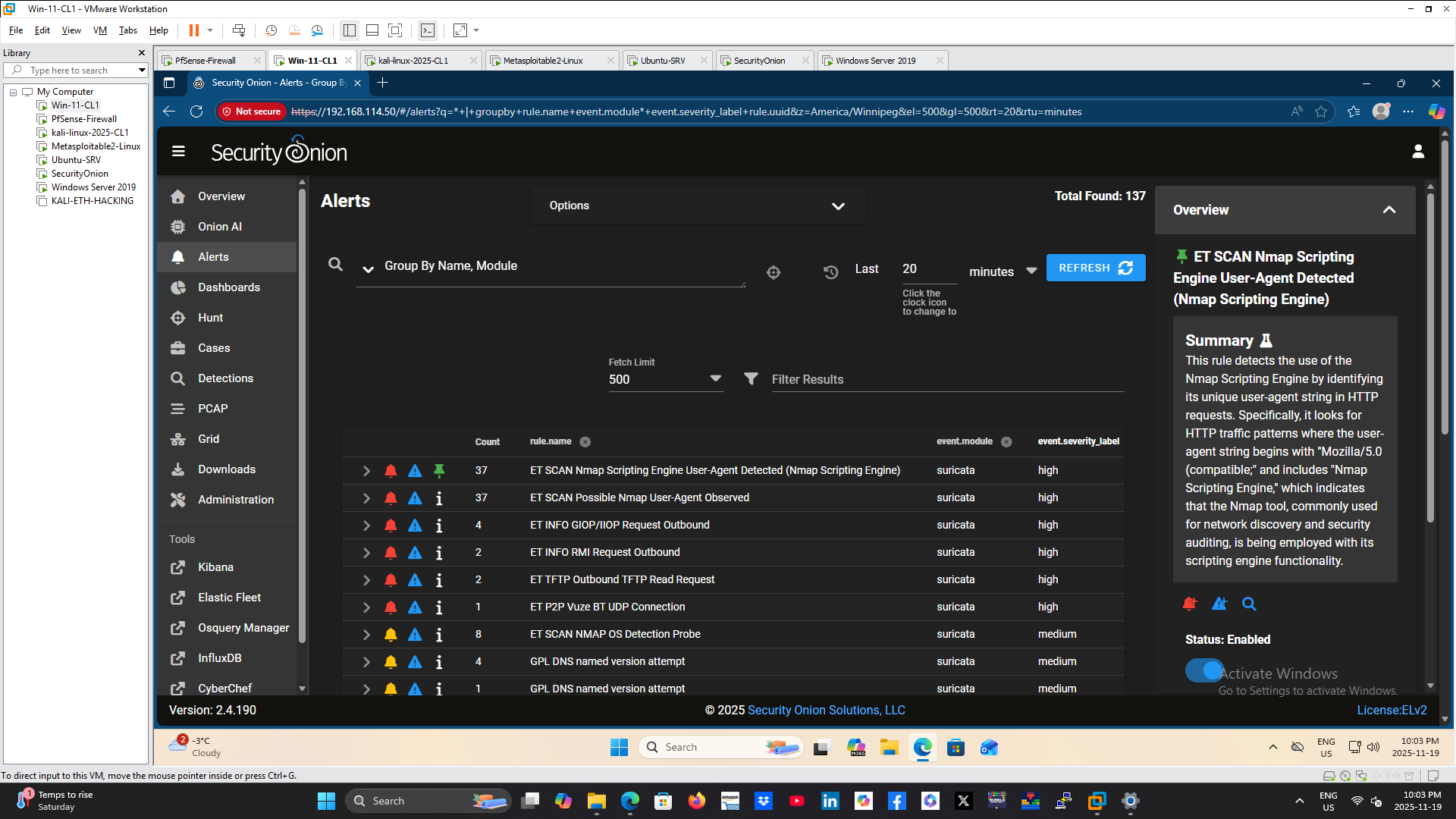
Security Onion Suricata alerts identifying Nmap scripting-engine activity, Nmap user-agent behavior, and operating-system detection probes.
PHASE 6 — ZEEK CONNECTION ANALYSIS
Zeek connection logs were queried using the reconnaissance source IP. The hunt returned thousands of connection records across many destination ports, which is consistent with broad service enumeration.
Zeek added context beyond the Suricata alerts by preserving timestamps, source and destination addresses, ports, protocols, and unique connection identifiers. This metadata helped reconstruct the sequence and scale of the scan.
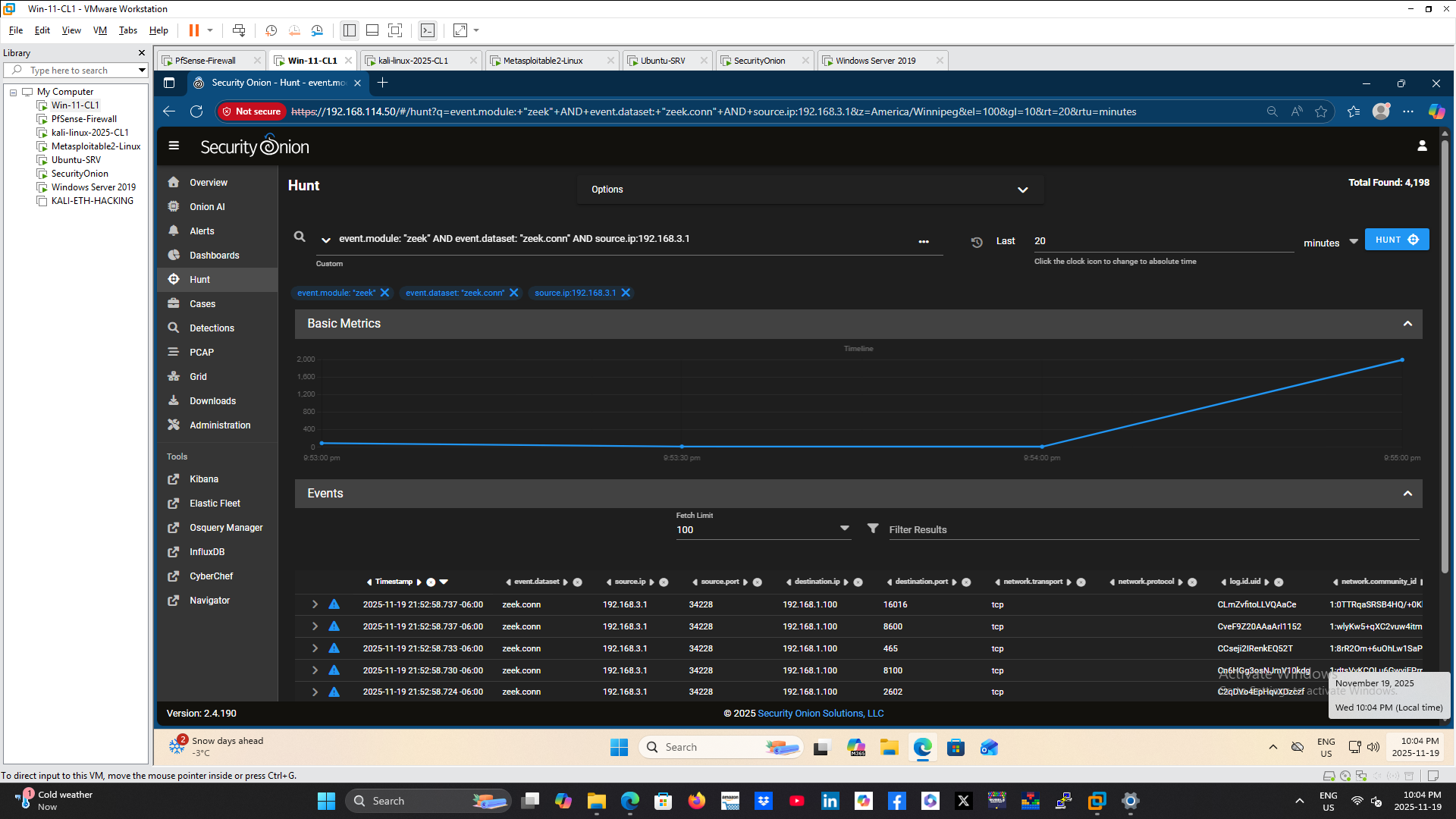
Zeek connection records showing high-volume connection attempts from the reconnaissance source to numerous ports on the target server.
INVESTIGATION FINDINGS
– Reconnaissance originated from Kali Linux at 192.168.3.1.
– The primary target was the Windows Server 2019 domain controller at 192.168.1.100.
– Nmap identified multiple services associated with Active Directory and Windows administration.
– The aggressive scan exposed service versions, OS characteristics, RDP metadata, SMB signing status, and traceroute information.
– The UDP scan identified reachable UDP services that were not visible through TCP enumeration alone.
– Wireshark confirmed the scan through repeated SYN probes, SYN/ACK responses, ICMP messages, and UDP traffic.
– Suricata generated Nmap-specific alerts within Security Onion.
– Zeek recorded thousands of individual connections that reconstructed the breadth of the reconnaissance activity.
– Correlation across Nmap, Wireshark, Suricata, and Zeek produced a stronger conclusion than any single tool alone.
RESULT
The lab successfully demonstrated the full detection lifecycle of Nmap reconnaissance against a Windows domain server. The investigation connected the source workstation, target host, discovered services, packet-level scan patterns, IDS alerts, and Zeek metadata into a clear timeline.
The exercise also showed why reconnaissance should be treated as an early warning indicator. Detecting broad scanning activity before exploitation gives defenders an opportunity to investigate, restrict access, and harden exposed services.
SKILLS DEMONSTRATED
– Network reconnaissance analysis
– Nmap host and service discovery
– TCP SYN scan analysis
– UDP scan analysis
– Operating-system fingerprinting
– Active Directory service enumeration
– Wireshark packet analysis
– Security Onion investigation
– Suricata alert analysis
– Zeek connection-log analysis
– TCP/IP troubleshooting
– SOC investigation workflow
– Incident documentation
– Cross-platform evidence correlation
TECHNOLOGIES USED
Kali Linux, Nmap, pfSense, Windows Server 2019, Active Directory, Windows 11, Wireshark, Security Onion, Suricata, Zeek, and VMware Workstation.
KEY TAKEAWAYS
This project reinforced the importance of combining signature-based detection with detailed network metadata. Suricata quickly identified recognizable Nmap behavior, while Zeek preserved the connection history needed to understand the scan’s scope. Wireshark provided packet-level confirmation of the underlying TCP, UDP, and ICMP activity.
Together, these tools showed how defenders can progress from an automated alert to a validated and documented investigation.
RECOMMENDED MITIGATIONS
– Restrict management and directory services to approved source networks.
– Segment sensitive servers from user and untrusted networks.
– Disable unnecessary services and close unused ports.
– Use host and network firewalls to limit administrative access.
– Alert on one source contacting many ports or hosts within a short period.
– Monitor Nmap user-agent, OS-detection, and scripting-engine signatures.
– Baseline normal administrative scanning so unauthorized reconnaissance can be distinguished from approved activity.
– Review exposed Active Directory, SMB, LDAP, RDP, WinRM, and RPC services regularly.
– Use IDS, network metadata, and centralized logging together for investigation.
– Investigate reconnaissance promptly because it may precede exploitation.
0 Comment